Markdown (.md) is a lightweight text-formatting syntax that lets you write readable content without cluttering your file with raw HTML tags. When Jekyll builds your site, it automatically parses Markdown files into clean HTML.
Here is a quick reference guide on everything you can build using Markdown files.
1. Headings
Use # symbols before your text to create titles and section headers.
# Heading 1 (Main Page Title)
## Heading 2 (Main Section Breaks)
### Heading 3 (Sub-sections)
#### Heading 4 (Minor Sub-sections)
2. Text Formatting
Apply simple symbols around your words to style text:
Bold text for emphasis
Italic text for subtle highlights
Bold and italic for extra emphasis
Strikethrough text
Inline code for short references like variables or commands
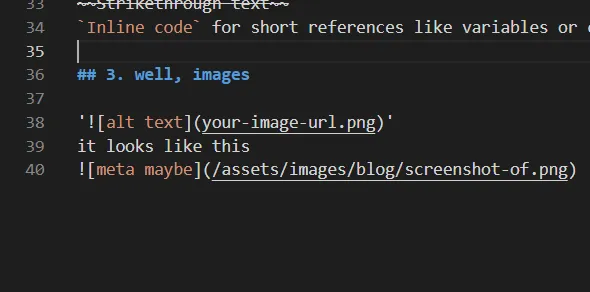
3. well, images
you can use this format :

or this one, to prevent broken image paths when you hosted on github page:

it looks like this
4. Lists
bullet lists:
- 3D Asset Creation
- Retopology & UV Mapping
- PBR Texturing
numbered lists:
- Export high-poly mesh from Blender
- Bake maps in Substance Painter
- Set up material shaders in-engine
checklist:
- High-poly modeling completed
- UV unwrapping finished
- Final renders in Cycles
5. Blockquotes
Use the > character to highlight key quotes, notes or tips:
Documenting the creation process is just as important as presenting the final render.
6. Code Blocks & Syntax highlighting
To display multi-line code blocks, wrap the code with triple backticks (```). You can add the language name right after the top backticks for syntax coloring:
{
  "assetName": "Sci-Fi Console",
  "polygonCount": 18450,
  "textureResolution": "4096x4096"
}
7. Data Tables
Create structured spec sheets or quick comparisons using pipes | and dashes -:
| Asset Name | Triangle Count | Texture Maps | Render Engine |
|---|---|---|---|
| Classic Car Chassis | 48,200 | Albedo, Normal, Roughness | Cycles |
| Sci-Fi Door | 8,500 | Albedo, Normal, Metallic | EEVEE |
In here i use my own styling(yes, you can style your table too), to match my website’s styling.
here’s my table css:
table {
  table-layout: auto;
  width: 80%;
  margin: auto;
  background-color: #00000026;
  border: 1px solid var(--border-color);
  border-radius: 12px;
}
thead {
  background-color: #ffffff26;
}

th,
td {
  padding: 0.6em;
  border-radius: 8px;
}
8. Horizontal Rules
Use three dashes — or asterisks *** on a blank line to insert a clean section divider line:
Section finished above.
New topic starts here.
9. Links
My portfolio url is [remtromol.site](https://remtromol.site).
My portfolio url is remtromol.site